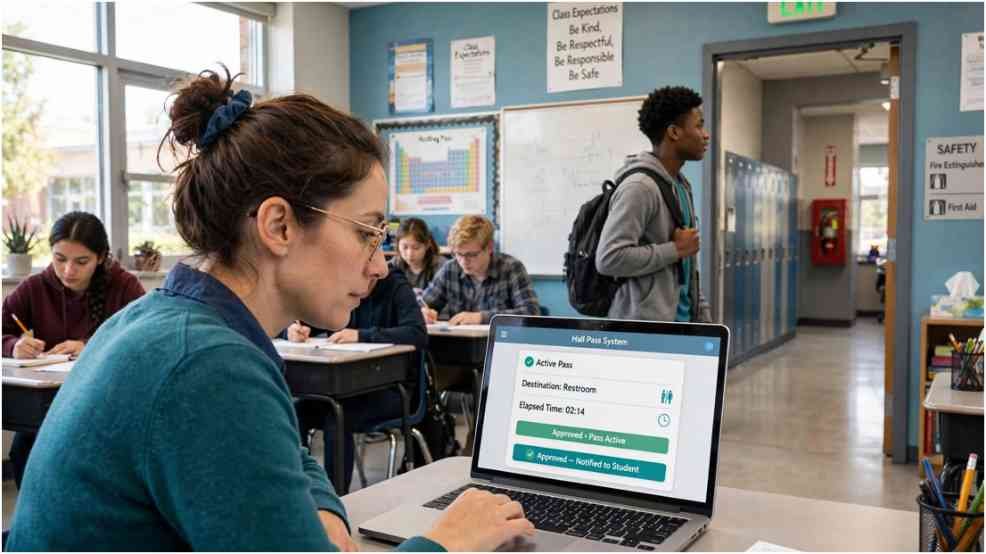
A paper hall pass can show that a student received permission to leave. It cannot show staff whether the pass remains active or how long the student has been away. Securly Pass replaces that paper trail with a digital workflow designed for K–12 schools.
I approached the platform with one practical question: does it make student movement easier to manage without creating another classroom distraction? Its value becomes clearer when we examine how one pass moves through a normal school day.
What Is Securly Pass?
Formerly known as eHallPass, the platform helps schools issue, approve, and manage electronic hall passes. Students select a departure point and destination. A teacher then approves or denies the request based on school rules.
The live dashboard shows active passes, recorded destinations, and time away from class. Administrators can also review usage patterns. According to the official Securly product page, schools can establish limits for students, groups, grades, and destinations.
This distinction matters: Securly Pass does not provide GPS tracking. It records pass information rather than detecting a student’s exact physical position.
How the Digital Hall Pass Works
The system turns a familiar permission process into a documented sequence. Schools configure the rules, destinations, user accounts, and integrations before students begin using it.
Requesting and Approving a Pass
A student opens the school-approved website or application and selects a destination. The software checks configured restrictions before sending the request.
Those checks may include the student’s pass limit, destination capacity, room availability, and Contact Control rules. A teacher can approve or reject the request from the classroom interface. Schools may also allow certain passes to start automatically.
Students without personal devices are not automatically excluded. Proxy Pass lets a teacher create a pass for them. Pass Kiosk supports shared devices in places such as gyms, cafeterias, and offices.
Recording Arrival and Return
An approved pass displays its start time and intended destination. Staff can see that record on the live dashboard. Depending on school settings, an authorized adult may confirm arrival, or the pass may end under configured rules.
The platform provides operational visibility, not proof of every step the student takes. Schools still need supervision and clear hallway procedures.
Digital Hall Pass Features That Change Hallway Management
The platform extends beyond replacing a handwritten slip. Its controls affect how schools manage capacity, contact, tardiness, and recurring out-of-class time.
Live Dashboard and Pass Limits
The dashboard allows authorized staff to see active passes from one screen. They can identify aging passes and view recorded destinations without calling several classrooms.
Schools can set pass limits for individuals or larger groups. They can also limit how many students may visit a location simultaneously. That feature can reduce restroom congestion without imposing the same restriction on every student.
Schools already using centralized portals may recognize a similar access model in MyKaty Cloud Tools. Both approaches depend on accurate rosters, reliable authentication, and clear user permissions.
Contact Control and Emergency Readiness
Contact Control prevents selected students from holding active passes at the same time. Schools may use it to discourage planned meetups, bullying, conflicts, or vaping gatherings.
During an emergency, the dashboard can show which students had active passes and their recorded destinations. Staff should treat this information as one operational signal. It cannot replace attendance checks, radios, room sweeps, or emergency protocols.
Classroom and School-System Integration
Securly Pass can operate inside Securly Classroom, allowing teachers to manage requests without switching between unrelated systems. It can also synchronize rosters through supported school information systems.
This integration reduces duplicate data entry. It also raises the stakes of correct permissions. A school should test account roles before launch and remove access when staff responsibilities change.
How to Access the Securly Pass Login
Students and staff should use the official district-provided link. The public login page is available at pass.securly.com/login, but the available sign-in method depends on the school.
A typical login follows four steps:
- Open the official login page or district portal.
- Select the school-approved SSO provider, such as Google or Clever.
- Enter the school-issued account credentials.
- Complete any district authentication prompt.
Users should not enter school credentials on unofficial help sites. If login fails, they should confirm the selected account, browser permissions, and district link. The Android version is also available through Google Play.
My Five-Minute Pass Test
I use a five-minute scenario when evaluating a digital hall-pass workflow. Imagine that Maya requests a pass from Room 204 to the nurse at 10:05 a.m. The nurse’s office has capacity, and Maya remains below her daily limit.
The teacher approves the request at 10:06. The dashboard now displays Maya’s active pass, starting room, intended destination, and elapsed time. If Maya has not completed the trip by 10:16, staff can notice the aging pass and follow school procedure.
This example exposes the product’s real strength. Securly Pass creates a visible chain of permission and responsibility. It does not claim to place a moving dot on a map.
Benefits and Limitations for US Schools
The main benefit is consistent documentation. Teachers spend less time writing slips, while administrators gain reports about frequent destinations and extended absences.
Data can reveal operational problems. Repeated long waits for one restroom may signal insufficient capacity rather than student misconduct. High pass volume during one class may reveal a scheduling or engagement issue.
The limitations deserve equal attention. Devices can fail, networks can disconnect, and incorrect settings can block legitimate requests. Students with medical or disability-related needs may require flexible rules. Schools should never let an automated limit override an urgent health need.
Parents familiar with Amazon Parent Dashboard may understand why granular controls matter. However, school movement records carry different legal, educational, and equity implications than household media settings.
Student Privacy Without the Guesswork
School leaders should explain what information the system collects, who can view it, and how long records remain available. The US Department of Education’s FERPA guidance offers a useful starting point for handling education records.
A responsible rollout should include role-based access, staff training, retention rules, and a written escalation process. Families should also know that the system records pass activity but does not use GPS to follow students.
Securly Pass works best when administrators treat data as context rather than automatic evidence of misconduct. A frequent restroom pattern may involve health, disability, stress, or scheduling factors.
Final Bell: Make the Rules Clear Before Going Digital
I see genuine value in a digital pass that reduces interruptions and makes active permissions visible. Yet software cannot repair an unclear hallway policy.
Before activating Securly Pass, schools should test one ordinary request, one medical exception, one device-free request, and one network outage. If staff can handle all four fairly, the system has a sound foundation. If they cannot, the policy needs attention before the launch button does.
Frequently Asked Questions
1. Does Securly Pass track a student’s GPS location?
No. It records pass details, destinations, approvals, and duration rather than GPS coordinates.
2. Can students request passes without personal devices?
Yes. Schools can use teacher-issued Proxy Passes or shared Pass Kiosks.
3. Why is the Securly Pass login not working?
The user may have selected the wrong SSO account, used an unofficial link, or encountered a district configuration issue.
4. Can schools limit restroom passes?
Yes, but administrators should create reasonable exceptions for medical, disability-related, and urgent needs.